Computer Font: A Futuristic Display Typeface for Makers
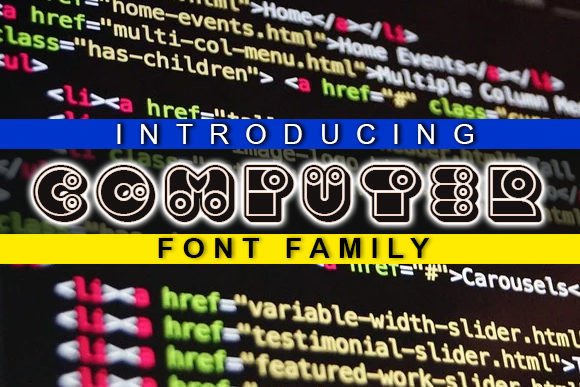
As a creator who spends hours tweaking designs for physical products and digital downloads, finding the right typography is often the difference between a project that looks homemade and one that looks professionally crafted. When we talk about display fonts in the crafting community, we usually lean toward flowing scripts or rustic serifs. However, there is a growing demand for modern, tech-inspired aesthetics in handmade goods, and this is where the Computer font truly shines. This cool 3D, futuristic display font offers a distinct visual personality that breaks away from traditional craft norms while remaining incredibly versatile for innovative projects.
For small shop owners and printable creators, Computer is not just a novelty; it is a strategic design asset. Its dimensional structure creates an immediate focal point, making it ideal for products that need to grab attention on a crowded marketplace feed or a busy craft fair table. Whether you are designing vinyl decals, sublimation transfers, or digital planner stickers, understanding how to leverage this typeface can elevate your brand identity and expand your product range into niche markets like gaming decor, tech accessories, and modern stationery.
Elevating Physical Products with Dimensional Type
The defining characteristic of Computer is its built-in 3D effect. For makers using cutting machines like Cricut or Silhouette, or those working with sublimation printers, this intrinsic depth saves significant production time. Instead of manually layering shadows or extruding text in vector software, the font arrives ready to use. This makes it exceptionally practical for creating bold statement pieces where readability and impact are paramount.
Consider the application of Computer in product packaging and labeling. A standard sans serif font might get lost on a textured kraft paper bag or a dark matte candle jar. In contrast, the futuristic weight of this display font provides necessary contrast and hierarchy. It works beautifully for:
- Tech and Gaming Accessories: Custom keycap sets, mousepad designs, and streamer merchandise benefit from the authentic retro-future vibe.
- Modern Nursery Decor: Moving away from traditional cursive, many parents now seek gender-neutral, space-themed, or STEM-inspired wall art. Computer is perfect for spelling out names or inspirational words like "Dream" or "Create" in printable nursery posters.
- Statement Apparel: For t-shirts and tote bags, the font’s thickness ensures the design remains legible even when printed on heathered fabrics or viewed from a distance.
- Seasonal Signage: Holiday markets are saturated with farmhouse scripts. Using Computer for "Cyber Monday" sales signs or futuristic Halloween party invitations helps your booth stand out through stylistic differentiation.
When applying this font to physical items, always consider the material texture. The 3D nature of Computer mimics embossing or raised printing. On smooth surfaces like acrylic blanks, ceramic mugs, or glossy sticker paper, the illusion of depth is most effective. On highly textured materials, ensure you scale the font up sufficiently so the intricate details of the letterforms do not get lost in the grain of the substrate.
Digital Downloads and Printable Design Strategies
For sellers of digital templates and printables, Computer serves as a powerful hook. In the digital space, customers scroll quickly; your thumbnail image must communicate value instantly. Because this typeface has such a unique silhouette, it acts as graphic art in itself. You do not need elaborate illustrations to make a template listing attractive; the typography does the heavy lifting.
This font is particularly valuable for specific digital niches. If you create social media templates, YouTube thumbnails, or Twitch overlays, Computer aligns perfectly with current design trends favoring Y2K and cyberpunk aesthetics. It is also excellent for educational printables aimed at older children and teens, such as coding club certificates, robotics camp flyers, or science fair project boards. The futuristic tone signals relevance to these subjects in a way that a traditional handwritten font cannot.
However, because Computer is a display font, it should be used intentionally. It excels at short phrases, titles, names, and single-word statements. Avoid using it for long paragraphs or detailed product descriptions. For body copy in your printable planners or invitation inserts, pair Computer with a clean, neutral sans serif font. This pairing maintains high readability for essential information while allowing the futuristic display font to serve as the decorative header. This balance is crucial for customer satisfaction; buyers want products that look artistic but remain functional and easy to read.
Font Pairing and Layout Considerations for Makers
Successful product design relies heavily on harmony. While Computer is visually striking, it needs supportive typography to create a complete composition. As a crafter, think of this font as the lead vocalist in a band; it needs a rhythm section to keep the song together.
- Pair with Minimalist Sans Serifs: To let the 3D elements breathe, combine Computer with simple geometric sans serif fonts like Montserrat or Open Sans. The clean lines of the secondary font prevent the design from looking cluttered.
- Contrast with Organic Scripts: For a unique juxtaposition, try pairing Computer with a delicate handwritten font. The hard edges of the futuristic letters against soft, organic script creates a dynamic tension that is very popular in modern wedding stationery and edgy greeting cards.
- Mind the Kerning: Display fonts often have tight spacing. When using Computer for all-caps titles on signs or shirts, check if manual kerning adjustments are needed to improve legibility. Sometimes adding slight tracking (letter spacing) enhances the futuristic, cinematic feel.
Always test your layouts at actual size before finalizing a product. What looks good on a 27-inch monitor may be illegible on a 2-inch sticker. Print a test page or cut a scrap vinyl piece to verify that the internal counters (the open spaces within letters like 'A' or 'O') are large enough to hold ink or weed cleanly. This practical step prevents wasted materials and ensures your customers receive a high-quality result.
Commercial Licensing and Professional Best Practices
For any handmade seller or digital creator, understanding licensing is non-negotiable. Before incorporating Computer into products intended for sale, verify the specific commercial license included with your purchase. Most premium font licenses cover physical end-products (like shirts, mugs, and signs) and static digital designs (like PDF printables). However, restrictions often apply to embedding the font in editable templates or selling the font file itself.
If you plan to sell editable Canva or Corjl templates featuring Computer, confirm that the license explicitly permits template creation. Some foundries require a separate extended license for this use case. Respecting these terms protects your business from legal issues and supports the type designers who create these essential tools. Additionally, check for multilingual support and alternate characters. Having access to ligatures or stylistic alternates can help you customize logos and branding assets, ensuring no two products look exactly identical.
Ultimately, Computer represents a shift toward more diverse typographic choices in the maker community. By embracing its futuristic charm and applying it with practical craftsmanship, you can create products that feel fresh, relevant, and commercially viable. Whether you are cutting vinyl for a laptop decal or designing a digital invitation for a tech conference, this display font offers the distinctive edge needed to capture attention in a competitive marketplace. Focus on readability, respect the licensing, and let the bold geometry of this typeface drive your next innovative collection.